
How to Create and Upload a Google Disavow File (With Examples)
A disavow file is a plain .txt list of links you want Google to ignore. Here is the format, real examples, how to upload it, and when not to use it.
By DigitalUs Media teamPublished 6 min read
A disavow file (or disavow list) is a plain text file with one URL or domain: entry per line, listing the links you want Google to ignore when it looks at your site. You upload it once per Search Console property, using Google’s disavow links tool.
Most sites never need one. This guide shows when you do, how to write the file, with examples from the real file we built for our own site, and how to upload it without making things worse.
When should you disavow backlinks?
Google’s disavow help page says you should disavow links only if both of these are true:
- You have a considerable number of spammy, artificial or low-quality links pointing to your site, and
- The links have caused a manual action, or likely will cause one.
Everything else, Google says it can usually handle without your help. A few odd links from scraper sites, directories you’ve never heard of, or a low “authority score” in an SEO tool are not reasons to disavow.
Situations where we’d consider it:
- You have a manual action for unnatural links in the Manual Actions report.
- You (or an agency before you) bought links or took part in link schemes, and you can’t get them removed.
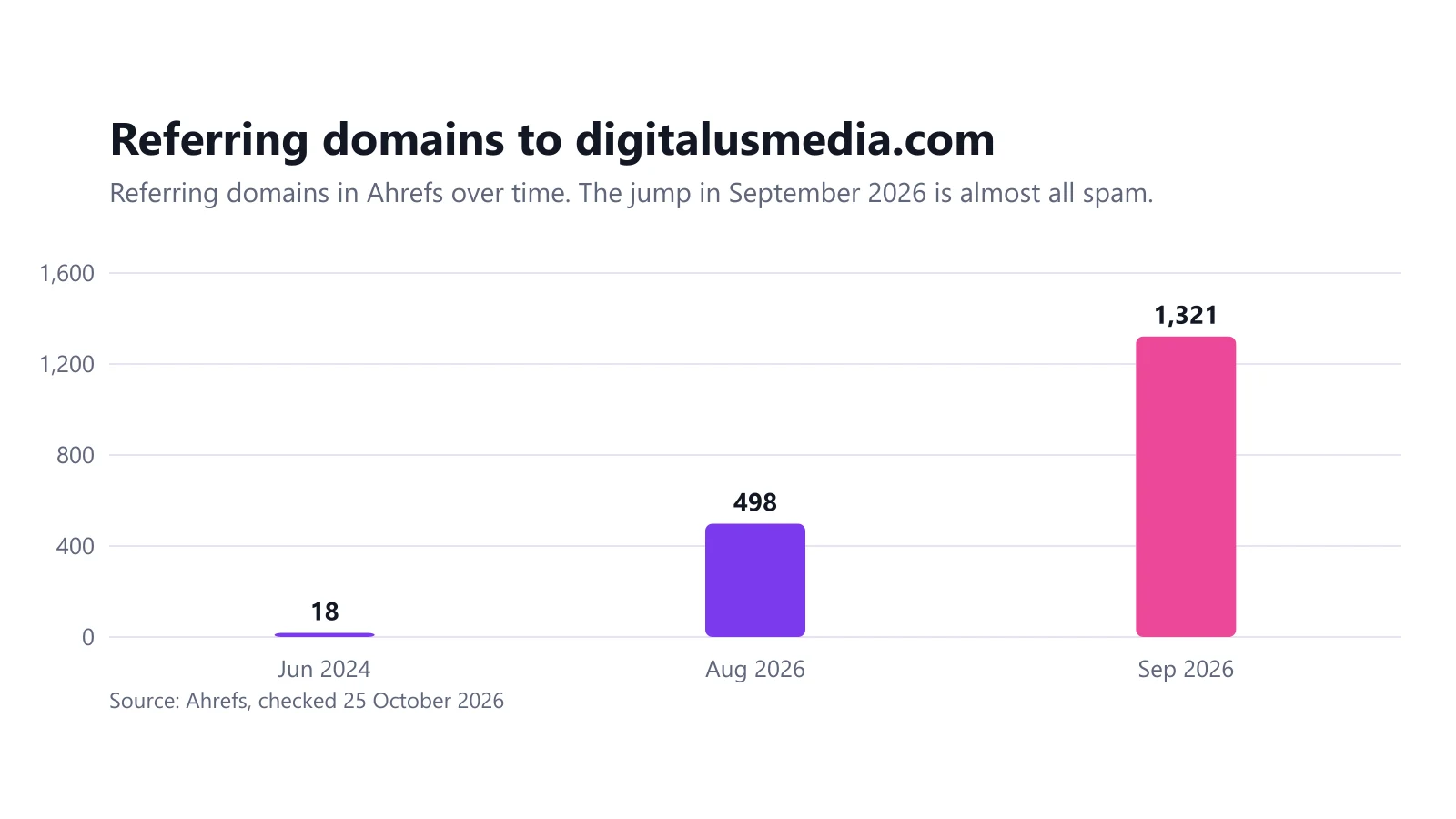
- A large wave of spam links arrives at once, with anchors that look like paid links. This is what happened to us: 1,198 junk domains, many with “Buy Backlinks” and “PBN Network” anchors, and Google impressions fell from 1,393 to 24 in the same month. The full story is in our negative SEO attack case study.
When you should not disavow
- Your traffic dropped, but your links look normal. Check indexing, technical problems, content quality and Google updates first.
- An SEO tool calls links “toxic” and nothing else is wrong. Tool scores are guesses. Google doesn’t see them.
- You want to “clean up” a profile that has a few hundred ordinary low-quality links. Google already ignores most of them.
- You aren’t sure a link is bad. Disavowing a good link throws away value. Google warns the tool “can potentially harm your site’s performance” if used incorrectly.
Disavow file format
The rules from Google’s documentation:
- Plain text file, encoded in UTF-8 or 7-bit ASCII.
- The file name must end in .txt.
- One entry per line: a full URL, or a domain prefixed with
domain:. - Lines starting with # are comments and are ignored.
- Maximum 100,000 lines (blank and comment lines count) and 2 MB.
- Maximum URL length is 2,048 characters.
- You can’t disavow a subpath like
example.com/blog/. It’s either a single URL or a whole domain or subdomain.
A minimal example:
# Spam network found 2026-10-25, removal requests got no reply
domain:spam-network.example
domain:links.another-example.xyz

# Single bad pages on otherwise normal sites
https://forum.example.com/thread/1234
https://blog.example.org/2024/05/paid-post/
Disavow URL vs domain: which should you use?
Use domain: for almost everything. Spam networks publish the same link on many pages and keep adding new ones. If you list URLs, the next page they create isn’t covered.
Use a URL only when the site is a normal, legitimate site and one page carries a bad link: a paid guest post on a real blog, for example, or a hacked page on an otherwise fine site.
Google’s documentation says a domain: entry works for a domain or a subdomain. In our view, list the registered domain (domain:example.com) for spam networks, so that every subdomain they spin up is covered, and list a subdomain (domain:blog.example.com) only when the rest of the domain is a legitimate site.
How to build your disavow list
1. Export your backlinks
Start with Google’s own data: the Links report in Search Console has an export of top linking sites. Third-party tools such as Ahrefs or Semrush usually find more domains; we used the Ahrefs referring domains export, which listed 1,219 live domains for our site.
2. Sort every domain into keep, review or disavow
Work at the domain level and put each one in a spreadsheet with a decision and a reason. Our split was:
| Decision | Domains | What went there |
|---|---|---|
| Keep | 3 | Real sites that had linked to us on their own |
| Review later | 18 | Auto-generated “site info” pages, worthless but not part of the attack |
| Disavow | 1,198 | Link sellers, PBN-style networks, “SEO checker” sites, numbered .xyz domains |
Our rule of thumb: if you hesitate on a domain, it goes in “review”, not in the file. You can always add it later.
How to recognize the ones that belong in the file is a topic of its own:
3. Write the file
Turn the “disavow” column into domain: lines and add comments so that you (or whoever comes after you) know why each block is there. This is the top of our real file:
# Disavow file for digitalusmedia.com
# Generated 2026-10-25 from Ahrefs live referring domains (1,219 total).
# Contents: domains flagged as spam by Ahrefs, plus link-seller / PBN / "SEO checker"
# networks and paid low-quality directories. Domain-level entries only.
# Not included: cmswire.com, theglobe.net, atspace.com (real links) and
# 18 unflagged info/stat sites listed in disavow-review.csv.
domain:11763731.xyz
domain:11763732.xyz
domain:11763734.xyz
It has 1,198 domain: lines and nothing else, well under the 100,000-line limit.
4. Check it before you upload
- Search the file for your own domain and for every domain in your “keep” list. Disavowing your own site or your best link by accident is the most common costly mistake.
- Make sure there are no
http://prefixes ondomain:lines (domain:example.com, notdomain:https://example.com). - Save it as UTF-8 plain text, not from a word processor. Our free disavow file generator handles the format, removes duplicates and protects your keep list.
How to upload a disavow file to Google
- Open the disavow links tool: search.google.com/search-console/disavow-links.
- Select the property. The tool doesn’t support Domain properties, so choose a URL-prefix property such as
https://example.com/. If you only have a Domain property, add and verify a URL-prefix property first. - If a list already exists, you’ll see a summary of it. Uploading a new file replaces the old list completely, so your new file must include everything you still want disavowed.
- Upload the .txt file. If it has errors, Search Console lists them and keeps your old list. Fix and upload again.
Google says it can take a few weeks before the list takes effect, because it is applied as Google recrawls the linking pages. Disavowed links still show in the Links report afterwards; that’s expected.
Updating or removing a disavow file
- To add domains, edit your file and upload the full new version. There is no “append”.
- To remove a domain, delete its line and upload the new version.
- To cancel everything, use the remove option in the tool. The disavowals stop applying over the following weeks.
Keep every version you upload, with its date. If you ever need a reconsideration request, or just want to know whether the disavow made a difference, you’ll need that history.
Does disavowing work?
It depends on why you used it. If you have a manual action for unnatural links, removing what you can, disavowing the rest and filing a reconsideration request is the documented route. If the links were already being ignored by Google, a disavow file changes nothing.
For our own site, we’ll publish the Search Console numbers in the case study once the file has had time to be processed.
If you’d like a second opinion before you disavow anything, link audits and cleanup are part of our link building service. We’d rather tell you not to disavow than send a file you don’t need.
Frequently asked questions
What is disavow in SEO?
Disavowing tells Google to ignore specific links pointing to your site when it assesses the site. You do it by uploading a .txt file of URLs and domains to the disavow links tool in Search Console.
Should I disavow a URL or a domain?
Use domain: entries for spam sites and link networks, because they keep adding new pages that link to you. Use a single URL only when the rest of the site is fine and just one page carries a bad link.
Does the disavow tool still work?
Yes. Google still offers the tool in Search Console, but says most sites don't need it because Google can usually work out which links to trust on its own.
How long does a disavow file take to work?
Google says it can take a few weeks to incorporate the list, because it is applied as Google recrawls the web and reprocesses the linking pages.
Can a disavow file hurt my site?
Yes, if you disavow good links. Google calls it an advanced feature that can harm your site's performance in Search if used incorrectly, so only list links you are sure are spam or paid.
Related guides
Link Building and Negative SEO
Our Site Was Hit by a Negative SEO Attack: 1,198 Spam Domains and a 98% Drop in Impressions
In September 2026 our own site went from 498 to 1,321 referring domains, and Google impressions fell from 1,393 to 24. Here is the data and what we did.
6 min read
Link Building and Negative SEO
Authority Backlinks: What They Are and How Sites Actually Earn Them
An authority backlink is a link from a site that is trusted and relevant in your field. Here is what Google actually measures, why DR and DA are not it, and how authority is built.
6 min read
Disavow File Generator
Paste spam URLs, domains or rows from a backlink export and get a clean disavow file in Google's format, ready to upload.
2 min read
SEO Strategy for Businesses
SEO for Small Businesses: What You Can Do Yourself, and When to Get Help
Most small businesses can handle the basics of SEO themselves: a clear website, a verified Google Business Profile and Search Console. Here's what to do first.
9 min read