
How to Find Toxic Backlinks (and Which Ones Actually Matter)
Export your referring domains, then look at anchors, domain names, traffic and timing. Most bad links can be ignored; a few patterns need action.
By DigitalUs Media teamPublished 5 min read
To find toxic backlinks, export your referring domains from Google Search Console and an SEO tool, then review them for a handful of signals: spam flags, no real traffic, link-seller domain names, keyword-stuffed or commercial anchors, and sudden spikes. Sort at the domain level, not link by link.
Most of what you’ll find doesn’t need any action. This guide shows how to find the bad links and how to tell the few that matter from the many Google already ignores, using the 1,219 referring domains we sorted for our own site as the example.
What are toxic backlinks?
“Toxic backlinks” is a label from SEO tools, not from Google. It usually means links that look manipulative: bought links, link networks, automated spam and scraper pages.
Google’s own wording is in its spam policies, under link spam: links meant to manipulate rankings, such as buying or selling links, excessive link exchanges, large-scale guest posting with keyword-rich anchors, and automated programs that create links. That definition is the one that matters, because it’s the one a manual action is based on.
Which toxic backlinks actually matter?
Google’s disavow documentation says that in most cases Google can assess which links to trust without extra guidance. So the question isn’t “are there bad links?” (every site has some), but “is there a pattern that looks like a link scheme?”
In our view, bad links matter when:
- You or someone working for you built them: paid posts, link packages, private blog networks, link exchanges.
- They arrive in volume with commercial anchors, such as “buy backlinks” next to your brand, even if you didn’t ask for them.
- There’s a manual action for unnatural links in Search Console, or you have good reason to expect one.
They usually don’t matter when they’re a scattering of scraper sites, “website worth” calculators and old directory listings with your plain URL as the anchor.
Step 1: Export your backlinks
Use at least two sources:
- Google Search Console, Links report. Open the Links report, then “Top linking sites” and export. It’s free and it’s Google’s own view, though it’s a sample, not every link.
- A backlink tool such as Ahrefs or Semrush. Export referring domains with their first-seen dates, domain rating, traffic and anchors.
For our site, the Ahrefs export on 25 October 2026 listed 1,219 live referring domains. Only three of them turned out to be real.
Step 2: Work at the domain level
Deduplicate to one row per referring domain. A spam network might link to you from 400 pages on one domain; you only need to make one decision about it.
Add three columns: decision (keep, review, disavow), reason, and first seen.
Step 3: Check these 7 signals
These are the signals we used, with what each looked like in our own data.
1. The tool’s spam flag
Ahrefs marks domains it considers spam in its referring-domain data, and other tools have similar scores. Treat this as a first filter, not a verdict. Most of our 1,198 disavowed domains carried the spam flag, but we still looked at the anchors before deciding.
2. No organic traffic
A site with no search traffic and no audience isn’t sending you visitors or trust. In our export, only three linking domains were genuine sites with a reason to link to us: cmswire.com, theglobe.net and atspace.com. Zero traffic alone isn’t proof of spam (small genuine blogs have none either), but combined with the other signals it is.
3. Link-seller and “SEO tool” domain names
Domain names often say what the site is for. In our list:
- 101 domains contained “backlink”, like
backlinker.shopand99backlinksbuy.com. - 237 contained “checker”, like
allbacklinkchecker.onlineandbacklinkcheckertools.shop. - 227 contained “seo”.
Nobody runs 237 backlink checkers to help users. These are networks built to carry links.
4. Numbered and cheap-TLD domains
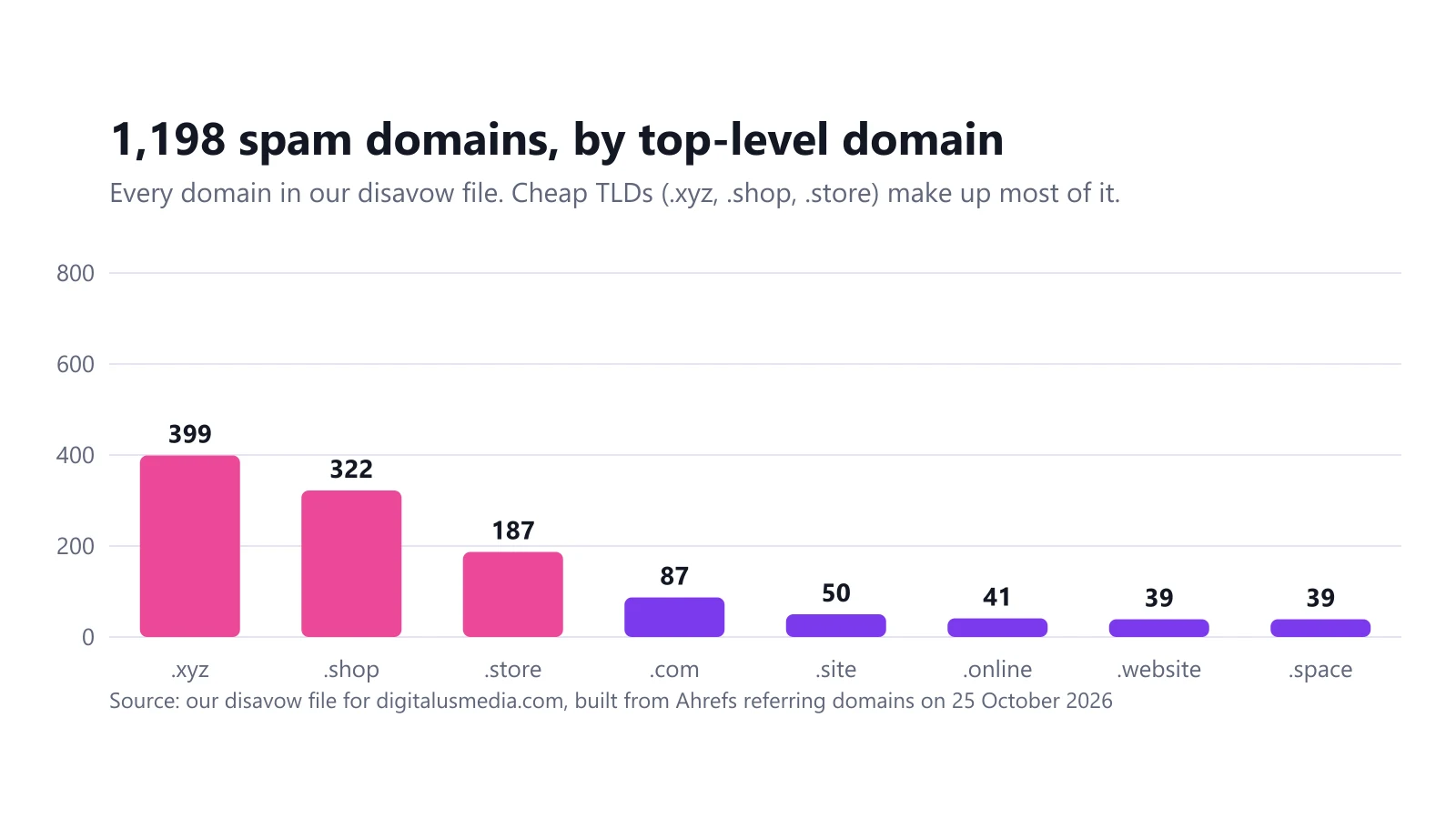
398 of our spam domains were numbered .xyz domains in sequence (11763731.xyz, 11763732.xyz, 11763734.xyz and so on). By top-level domain, .xyz, .shop and .store accounted for 908 of the 1,198, as the chart above shows.
A cheap TLD isn’t a problem on its own. Hundreds of sequentially numbered domains linking to the same site is.
5. Commercial or manipulative anchor text
Anchor text was the clearest signal of all. Ours included:
- “Premium Authority Link Building for digitalusmedia.com…” on 264 domains, all dofollow.
- “High Quality Dofollow Backlinks… PBN Network… Buy Backlinks” on 41 domains, dofollow.
- “Advanced Niche Edit Links for digitalusmedia.com…” on 14 domains, dofollow.
- A fake testimonial advertising a link service on 560 domains, nofollow.
Sort your anchors report by number of referring domains and read the top 50. Phrases about buying, packages, PBNs or “dofollow” are what Google’s link spam policy describes.
6. Followed vs nofollow
Google asks sites to mark paid and sponsored links with rel="sponsored" or rel="nofollow" (see qualifying outbound links). A nofollow spam link passes no ranking signal by design. The followed links with commercial anchors are the ones that look like an unmarked paid link, so those go to the top of the list.
7. Sudden spikes and shared first-seen dates
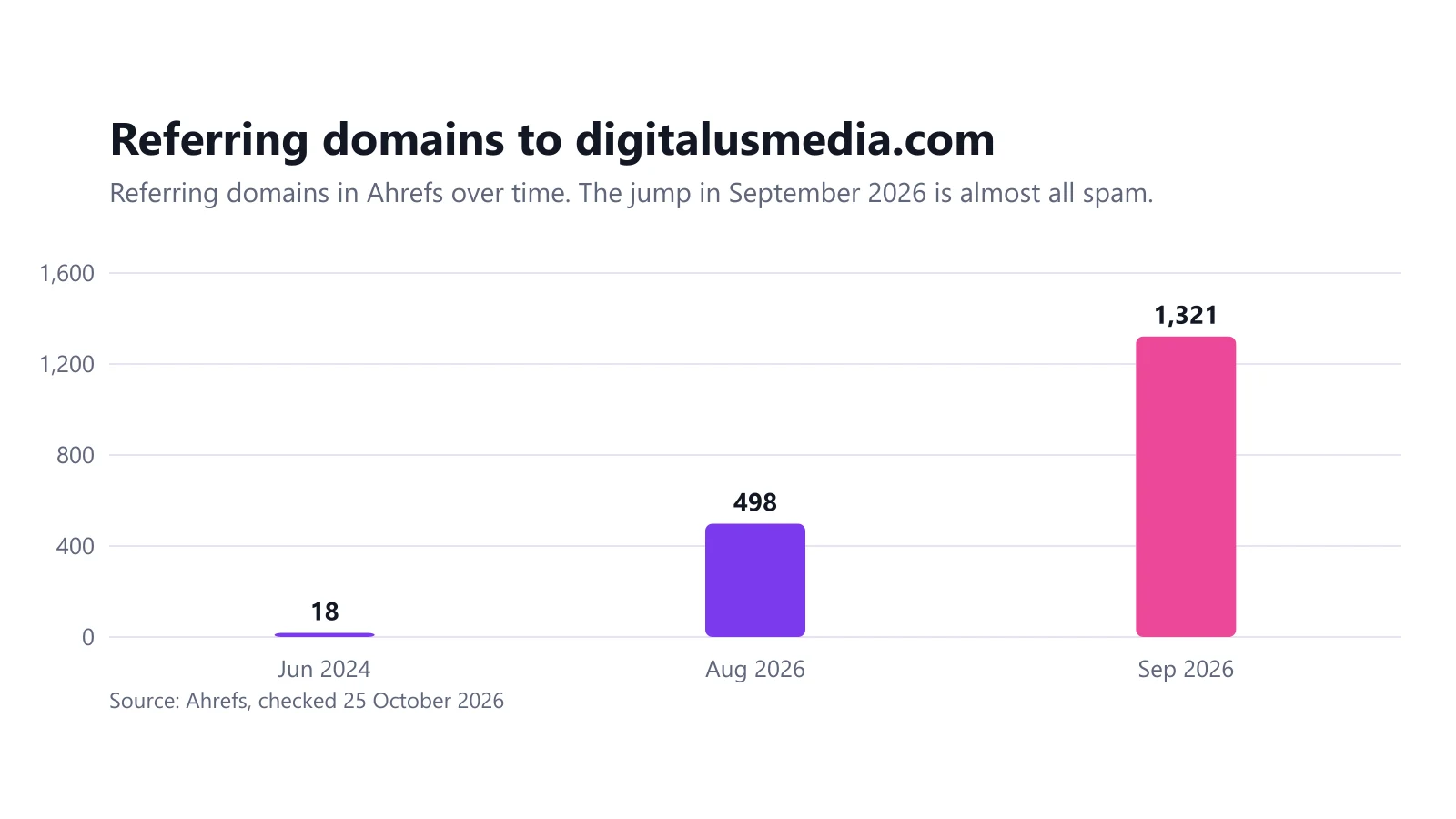
Real links trickle in. Ours went from 498 referring domains in August 2026 to 1,321 in September. Six domains with the same DR 61 (hotfri.com, zlutag.com, yelpad.com, gigbic.com, mantaw.com and dotpim.com) all appeared on 14 and 15 September 2026. Sort by first-seen date and look for clusters like these.
Step 4: Decide what to do
| What you found | What we’d do |
|---|---|
| Links you or a previous agency paid for | Ask for removal, disavow what stays, keep records |
| A large spam wave with commercial anchors | Disavow at the domain level |
| A manual action for unnatural links | Remove, disavow, then file a reconsideration request |
| Scattered scraper and directory links | Leave them; Google already ignores them |
| Anything you’re unsure about | Put it in “review” and check again next month |
Our final split was 3 domains to keep, 18 to review and 1,198 to disavow. How we turned that into a file is in our guide to creating and uploading a disavow file (our disavow file generator does the formatting), and the full story, including what happened to our search visibility, is in our negative SEO attack case study.
How often should you check for toxic backlinks?
For a small site, a monthly look at new referring domains is enough. Most tools can send an alert for new or lost links. If we’d had one set up, we’d have seen our spike within days instead of weeks.
What to do instead of chasing every bad link
Cleaning up links only removes risk; it doesn’t add any strength. A few real links from sites in your industry will do more than a perfect disavow file. That’s how we approach our link building work: audit and clean up when needed, then spend the effort on links that are worth having.
Frequently asked questions
What are toxic backlinks?
"Toxic backlinks" is an SEO-tool term for links that look manipulative or spammy: paid links, link networks, and automated spam. Google doesn't use the word; its spam policies talk about link spam and link schemes.
How do I check for toxic backlinks for free?
Export the top linking sites from the Links report in Google Search Console and review the domains and anchor texts by hand. Free tiers of third-party tools show more domains, but Search Console is the data Google itself reports.
Do toxic backlinks hurt rankings?
Usually not. Google says it can assess which links to trust without help in most cases. Links become a real risk when they look like a link scheme you are responsible for, or when they could lead to a manual action.
Should I disavow every link a tool marks as toxic?
No. Tool scores are estimates and Google doesn't see them. Disavow only clear spam or paid-link patterns, and only when there is a manual action or a real risk of one.
Related guides
Link Building and Negative SEO
Our Site Was Hit by a Negative SEO Attack: 1,198 Spam Domains and a 98% Drop in Impressions
In September 2026 our own site went from 498 to 1,321 referring domains, and Google impressions fell from 1,393 to 24. Here is the data and what we did.
6 min read
Link Building and Negative SEO
How to Create and Upload a Google Disavow File (With Examples)
A disavow file is a plain .txt list of links you want Google to ignore. Here is the format, real examples, how to upload it, and when not to use it.
6 min read
Link Building and Negative SEO
Negative SEO: What It Is, Whether It Works and How to Protect Your Site
Negative SEO is any attempt to hurt another site's rankings from the outside. Google says it ignores most of it. Our own data shows why small sites should still watch for it.
5 min read
Link Building and Negative SEO
Authority Backlinks: What They Are and How Sites Actually Earn Them
An authority backlink is a link from a site that is trusted and relevant in your field. Here is what Google actually measures, why DR and DA are not it, and how authority is built.
6 min read