
Negative SEO: What It Is, Whether It Works and How to Protect Your Site
Negative SEO is any attempt to hurt another site's rankings from the outside. Google says it ignores most of it. Our own data shows why small sites should still watch for it.
By DigitalUs Media teamPublished 5 min read
Negative SEO is any attempt by someone else to lower your site’s rankings in search: pointing thousands of spam links at it, copying its content, hacking it, or filing false reports about it. Google says its systems ignore most of it, and for established sites that’s largely true.
For small sites it’s less clear-cut. Our own site lost 98% of its Google impressions in the month a wave of spam links arrived. This guide covers the techniques, what Google says, what our data shows, and how to protect a site without overreacting.
What is negative SEO?
Normal SEO tries to improve your own site. Negative SEO tries to damage a competitor’s site from the outside, by making it look like it breaks Google’s spam policies or by making it harder for Google to crawl and trust.
Not every spam link is an attack. A lot of link spam is automated: link sellers scrape domain names and use them in anchor texts to advertise their packages. The effect on your link profile can look the same either way.
Negative SEO techniques
Spam link attacks
The most common technique, and the cheapest. The attacker buys thousands of links from link networks, private blog networks or automated spam tools and points them at your site, often with commercial or adult anchor texts. The goal is to make your profile look like you’re buying links.
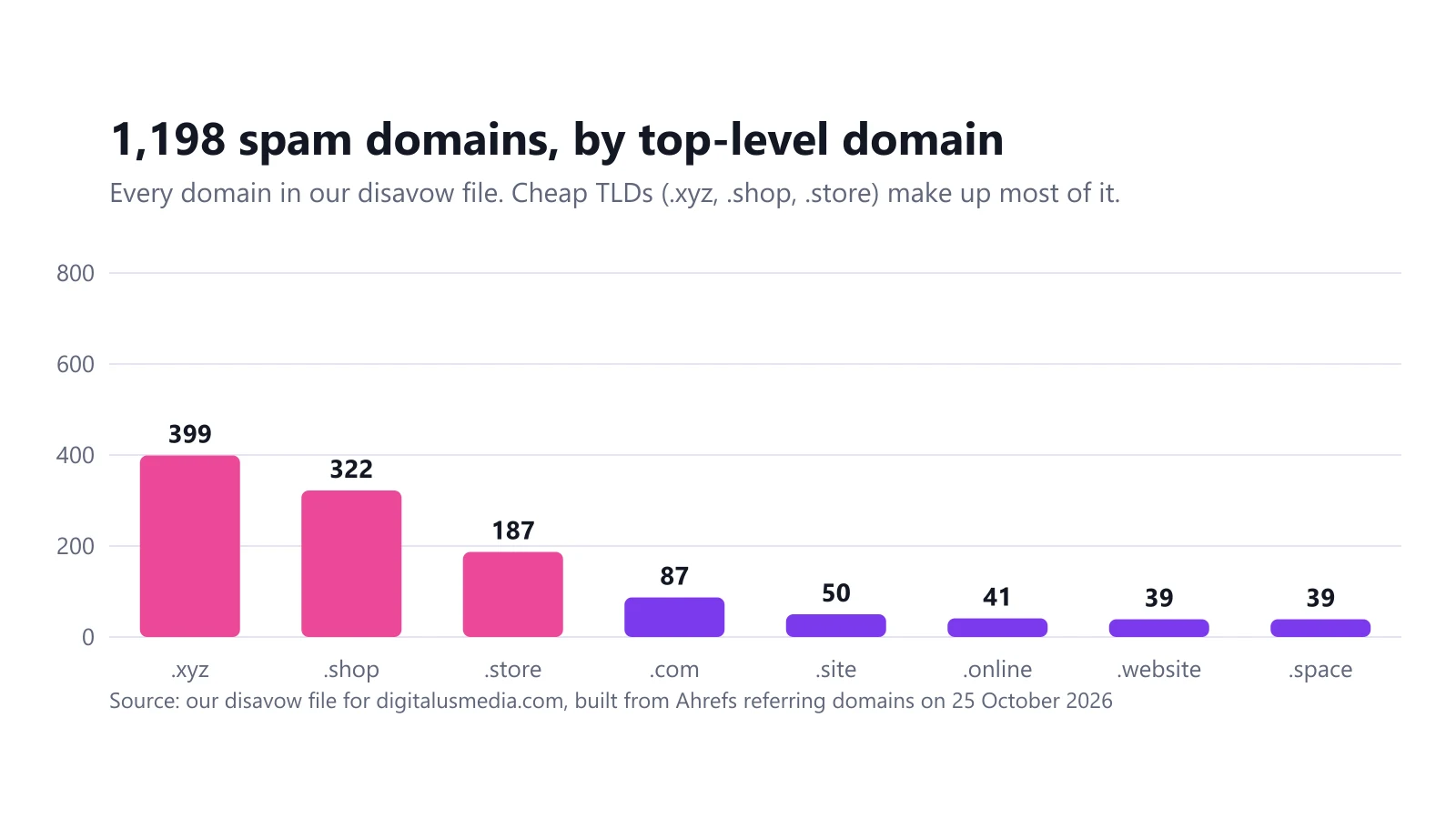
This is what hit our site in September 2026: 1,198 junk domains, with anchors such as “High Quality Dofollow Backlinks… PBN Network… Buy Backlinks” next to our domain name. The full data is in our negative SEO attack case study.
Negative SEO without backlinks
- Content scraping. Your pages are copied to other domains, sometimes before Google has indexed the original. Google’s spam policies list scraping as a violation by the copying site, not by you.
- Hacking. Attackers inject spam pages, hidden links or redirects into your site. This one is serious, because the spam is on your own domain and can lead to a security warning or a manual action.
- Fake removal requests. Someone pretending to be you asks sites that link to you to remove the links, or files false copyright complaints against your pages.
- Fake reviews. Floods of negative reviews on your business profiles. This mostly hurts local search and conversions rather than organic rankings.
- Aggressive crawling. Bots that hammer the server until it slows down or returns errors, which can make Googlebot slow its crawling of the site.
Does negative SEO work?
Google’s position: in most cases it can tell which links to trust without help. Its disavow documentation says most sites will never need to disavow, and Google says it “works very hard to make sure that actions on third-party sites do not negatively affect a website”. Its December 2022 link spam update describes SpamBrain detecting and neutralizing unnatural links. Neutralized links pass no value, good or bad.
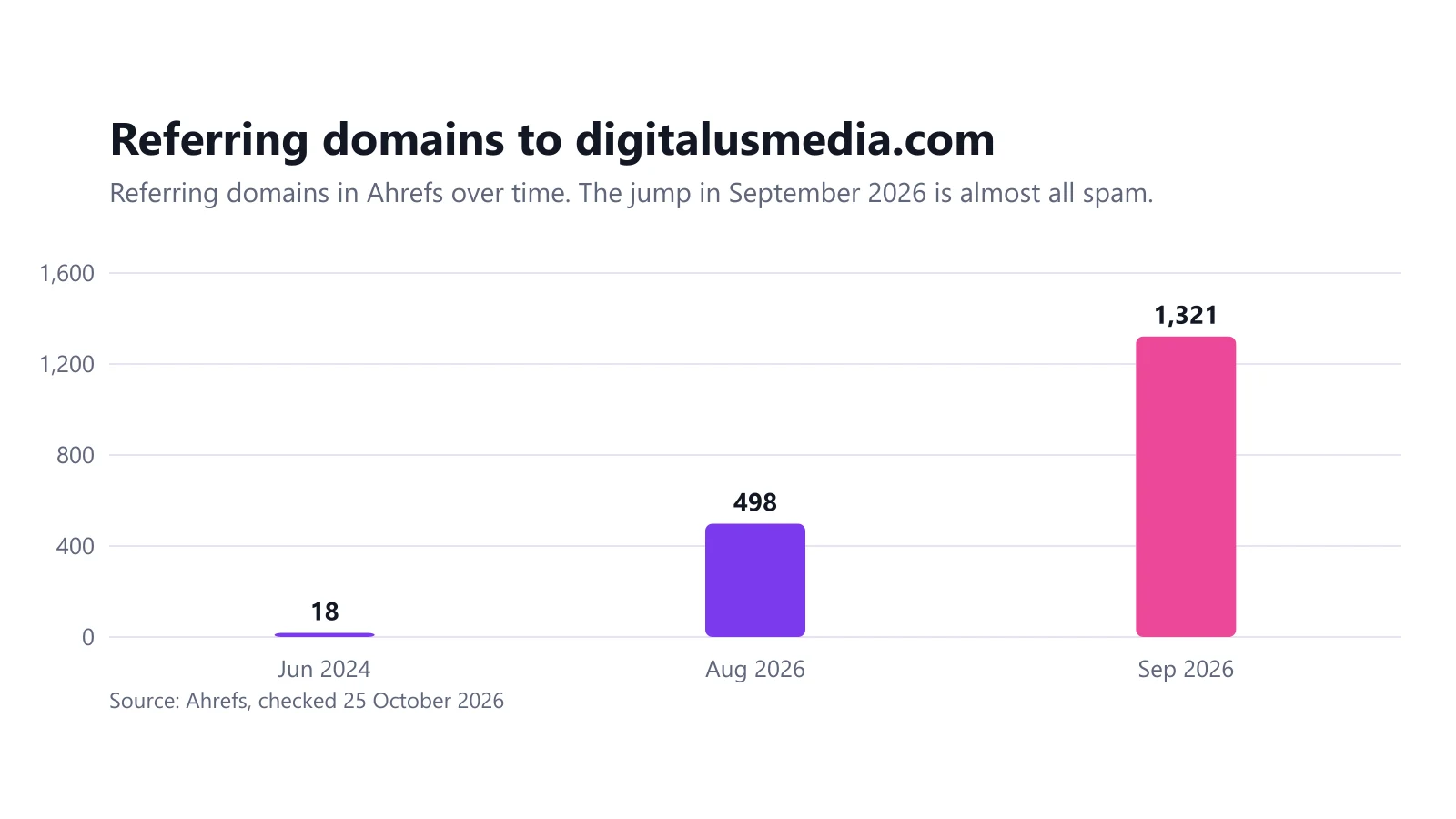
Our data: our site, with only three genuine referring domains, went from 498 to 1,321 referring domains between August and September 2026. In the same month, Google Search impressions fell from 1,393 to 24, and nothing changed on the site itself.
Both can be true. We can’t prove the links caused our drop: a manual action, a Google update in the same weeks or another cause are all possible. But in our view, a site with almost no real authority is more exposed than one with thousands of genuine links, because there’s nothing on the other side of the scale.
Our rule of thumb: assume Google is ignoring the spam, but verify it with your own Search Console data rather than taking it on faith.
How to tell if you’re under attack
Signs worth checking each month:
- A sudden jump in referring domains from sites unrelated to yours. Ours nearly tripled in a month.
- Commercial anchors like “buy backlinks”, “PBN” or “dofollow” next to your brand.
- Dozens of domains appearing on the same day. Six of ours all appeared on 14 and 15 September 2026.
- Copies of your pages on other domains (search for a distinctive sentence in quotes).
- Pages on your site you didn’t create, found with a
site:search or in the Pages report. - A message in the Security Issues or Manual Actions report in Search Console.
How to sort the links themselves is covered step by step in how to find toxic backlinks.
How to protect your site from negative SEO
1. Monitor links and Search Console
Set a monthly reminder (or an alert in your backlink tool) for new referring domains, and check Search Console’s Manual Actions and Security Issues reports. Search Console emails you about most problems, but only if someone reads that inbox.
2. Keep the site secure
Most of the damaging non-link attacks start with a hacked site. Keep the CMS, plugins and server up to date, use strong passwords with two-factor authentication, and remove plugins you don’t use. Moving our own site from WordPress to a static site in October 2026 removed most of that attack surface.
3. Build some real authority
A handful of genuine links from relevant sites makes your profile much harder to distort. That’s slow work, but it’s the only part of this list that also helps your rankings.
4. Don’t panic-disavow
A few hundred random spam links don’t need action. Disavow when there is a clear pattern of paid-looking links and a manual action, or a real risk of one, as Google’s guidance says. When that’s the case, here is how to create and upload a disavow file.
How to report negative SEO
- Spam pages and link networks: report them through Google’s spam report form. Google uses these reports to improve its systems; don’t expect an individual reply.
- Scraped copies of your content: file a copyright removal request with Google if the copy infringes your copyright.
- A manual action: fix what you can, disavow the rest, then file a reconsideration request explaining what happened and what you did, with dates.
- Hacking: clean the site, close the hole, then request a review from the Security Issues report.
When to get help
If your referring domains have jumped, your impressions have dropped and you can’t tell which caused which, a second pair of eyes helps. Link audits and cleanup are part of our link building service: we check whether the links are a real risk, rule out other causes first, and only build a disavow file when the data justifies it.
Frequently asked questions
What is negative SEO?
Negative SEO is any attempt by a third party to lower another site's search rankings, usually by pointing spam links at it, copying its content, hacking it, or filing false reports and removal requests.
Does negative SEO work?
Rarely, according to Google, which says it can assess which links to trust in most cases. On our own small site, though, Google impressions fell 98% in the month a spam link wave arrived, so we treat it as a real risk for sites with little authority.
Can negative SEO happen without backlinks?
Yes. Content scraping, hacking a site to inject spam, fake reviews, and false link removal or copyright requests are all forms of negative SEO that don't involve backlinks.
How do I report negative SEO to Google?
Report the spammy pages through Google's search quality report form, and check the Manual Actions and Security Issues reports in Search Console. If the attack is spam links and you have a manual action or expect one, use the disavow tool.
How can I tell if my site is under a negative SEO attack?
Look for a sudden jump in referring domains from unrelated or spam sites, commercial anchors like 'buy backlinks' next to your domain, copies of your pages on other domains, new pages you didn't create, or unexplained Security Issues in Search Console.
Related guides
Link Building and Negative SEO
Our Site Was Hit by a Negative SEO Attack: 1,198 Spam Domains and a 98% Drop in Impressions
In September 2026 our own site went from 498 to 1,321 referring domains, and Google impressions fell from 1,393 to 24. Here is the data and what we did.
6 min read
Link Building and Negative SEO
How to Find Toxic Backlinks (and Which Ones Actually Matter)
Export your referring domains, then look at anchors, domain names, traffic and timing. Most bad links can be ignored; a few patterns need action.
5 min read
Link Building and Negative SEO
How to Create and Upload a Google Disavow File (With Examples)
A disavow file is a plain .txt list of links you want Google to ignore. Here is the format, real examples, how to upload it, and when not to use it.
6 min read
Link Building and Negative SEO
Authority Backlinks: What They Are and How Sites Actually Earn Them
An authority backlink is a link from a site that is trusted and relevant in your field. Here is what Google actually measures, why DR and DA are not it, and how authority is built.
6 min read